What's new in Lemonify? Welcome to Lemonify 🍋
Click a citation and the page scrolls to the exact quote, highlighted in yellow. Here is everything added recently. Thanks for installing! Summarize a whole page in one click, or just the text you select. Here is what you get.
2.4.0 Click a citation, jump to the quote NEW
See the source of every point
- Summarize any page.
- Click a numbered reference such as 2* under a point.
- The page scrolls to the exact passage and highlights it in yellow, and the original quote opens in the panel.
Built for real pages
- Works while the summary is still being written.
- The highlight stays when you minimize and reopen the panel.
- Finds quotes on long articles, nested layouts and pages with hidden duplicate text.
- Works across languages: read the summary in English, see the quote in the original.
- Quotes are matched in your browser, on the page you are already viewing.
Try it now: summarize this very page, then click a reference.
2.3.0 Summarize only what you select
Summarize only what you select
- Select a passage on any page.
- Right-click it and open Lemonify AI.
- Choose Summarize selected text. Follow-up questions work on your selection too.
Try it right here
Reading online means a lot of text and little time. Most articles open with background, then give the details, and only near the end reach the point you came for. Lemonify turns a long passage into a short structured summary in your language, with numbered references you can check against the original. Select any part of this paragraph, right-click it, and choose Lemonify AI → Summarize selected text.
Nothing happens? Reload this tab once. The extension was just installed or updated and open tabs need a refresh.
📌 Tip: click the puzzle icon in your browser toolbar and pin Lemonify to keep it one click away.
Three Ways to Summarize
Use whichever fits the moment. The summary panel is the same every time.
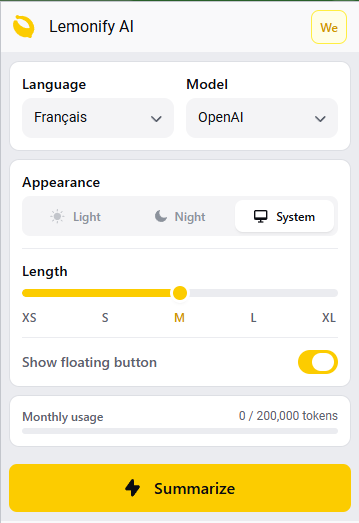
Click the toolbar icon
Open the Lemonify popup, pick the language, AI model and summary length, and hit Summarize.
Whole pageUse the floating button
Turn on the lemon button in settings and it waits in the corner of every page. Drag it wherever it doesn't get in the way.
Whole page · optionalRight-click any selection
Select text, right-click, choose Lemonify AI → Summarize selected text. Follow-up questions work on your selection too.
Selected text · newA Clear Summary, Right on the Page
The summary opens in a panel over the page you're reading, so you never lose your place.
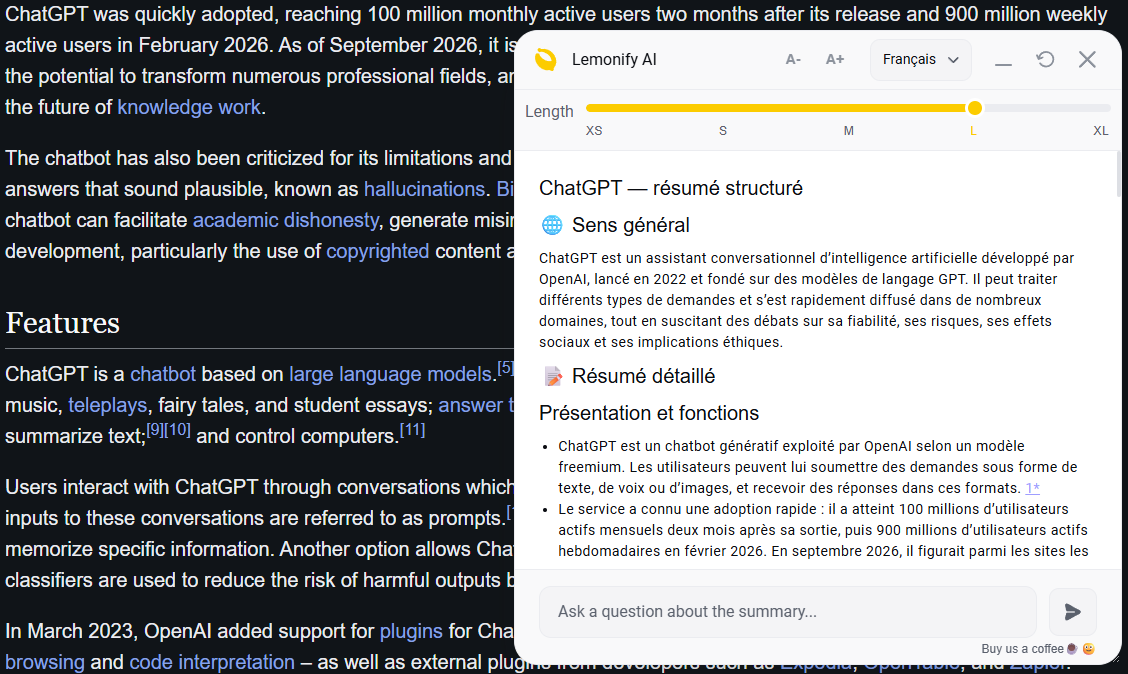
Structured and translated
Overview first, then the details, in the language you choose.
Length from XS to XL
Set the level of detail with the slider, then refresh to regenerate the summary.
Citations you can check
Click a numbered reference: the page scrolls to the original quote and highlights it.
Ask, resize, refresh
Ask follow-up questions, adjust the font, or regenerate in one click.
Click a Citation to Jump to the Source Quote
Check any point of an AI summary in one click, without hunting through the page.
An AI summary is only useful if you can trust it. Every point in a Lemonify summary carries numbered citations. Click one and the page scrolls to the exact passage it came from and highlights it in yellow, the same way Chrome marks a link to a text fragment. The original quote opens right in the summary panel, so you can compare the two at a glance.
- Scroll and highlightThe page jumps to the quoted text and marks it. The highlight stays until you click elsewhere on the page.
- Quote in the panelThe source quote appears under the point in gray italics, in its original language, even when you read the summary in another one.
- Works on real pagesLong articles, nested layouts, hidden duplicate text, special characters, and summaries that are still being written.
- Matched in your browserFinding the quote happens locally on the page you are viewing. Nothing extra is sent anywhere.
With Lemonify, you can...
Transform the way you consume content online with intelligent summarization
Summarize a page or just a selection
One click for the whole article, or select a passage and summarize only that. No copy-paste, no switching tabs.
Summarize in any language
Read and summarize content in 50+ languages, from English, Spanish and German to Hindi, Arabic and Japanese.
Refer back to source content
Summary points come with numbered citations. Click one and the page scrolls to the original quote, highlighted in yellow, so you can verify it.
Choose your summary length
Adjust the summary detail level on a scale from XS to XL to match your reading needs and time constraints.
Switch between AI engines
Choose between OpenAI and Gemini for the summarization approach that works best for your content.
Keep your privacy in your hands
Only the text you choose to summarize is sent for processing. We don't read your browsing and we don't sell your data.
Ask follow-up questions
Dig deeper with the built-in chat. Ask about the page, or about the passage you selected, right under the summary.
Read it your way
Choose a light or dark theme, or follow your system, and pick the font size that is comfortable for your eyes.
Always see your usage
A progress bar in the popup shows how many of your monthly tokens you've used. It resets on the 1st of every month.
50+ Languages Worldwide
🌍 Europe
🌏 Asia
🌍 Africa & Middle East
🌎 Americas
Who is Lemonify for?
Students & Academics
Digest academic texts, research papers, and scholarly articles very quickly. Perfect for studying, research, and literature reviews.
Professionals
Handle numerous reports, emails, and industry publications efficiently. Get comprehensive overviews to stay informed and productive.
Developers
Quickly understand documentation, technical articles, and API guides. Save time on research and focus on building.
Anyone Who Reads Online
Ideal for those eager to read more in less time. Got a long read and only one section matters? Select it and summarize just that.
Free to use, supported by coffee ☕
Lemonify is free. Sign in with Google to raise your limit.
If it saves you time and you'd like to help us keep it running, you can buy us a coffee, one-time or monthly, thanks ;)